Frequently Asked Questions

Get answers to your questions about aanmelder.nl

aanmelder.nl’s FAQ page is a valuable resource for anyone looking to get the most out of our platform. It contains answers to common questions, making it easy to find the information you need. If you have any further questions or concerns, please do not hesitate to contact our support team. Your answers are also available in our knowledge base. Go to knowledge base

Do you have other questions? Do not hesitate to contact us by email, phone or chat. We are always happy to help you when needed!

aanmelder.nl events

Browse through our frequently asked questions

Event Registration Software

What is e-mail authentication?

Email authentication can optimize the delivery of your sent messages. aanmelder.nl supports DKIM en DMARC e-mailauthentication. You can reduce the risk that your message will be seen as spam and ends up in the spam folder. Click here for more information about e-mail authentication Do you want to use email authentication on the domain name that you have set as the sender for your messages? Please contact us.

Is your event management software multilingual?

Yes. Our Event Management software is multilingual and available in Dutch, English and German. You can also make your communication, event site and registration form appear in these three languages. 

How do I make a refund to a participant?

Has a participant already paid and do you want to refund this payment? You can process refunds for each participant. Click here for instructions for a refund. You can also find information about Bulk refunds, if you need to do refunds for a specific participant group of all participants without having to do this per person.

What is the difference between a credit invoice and a refund?

A refund is a payment back to the participant if they have already paid. You can credit an invoice if the participant has not yet paid and you want to set the amount of the invoice to 0. Click here for the support article about refunds.

How do I share my event with my colleagues?

You can add (new) users into your organisation and add them to your events. You can manage the users when you are the owner of the organisation. Here you can add an user as a co-organizer or only give the user limited access to the registrations. If you click on ‘organization’ at the top right of the pink navigation bar, you will go to the organization dashboard. Here you can get started with your events and sharing the events with other users.

How can I edit the details on my invoice?

The invoice from aanmelder.nl you will be sent to the invoice address that you have added in your billing profile. Go to the pink navigation bar on your dashboard and click on ‘settings’. Here you can see which billing profile is used for this event and edit the profile when needed. You can also add PO numbers here. Do you mean the invoice details on a participant invoice? Go to ‘registrations’ on the dashboard where you can find the invoice of the participant. You can manage the participant invoices here.

How do I link questions in the registration form?

A tutorial is shown here about using the registration form and linking the questions. Or you can read the support article here. So you can make certain questions show as a result of an answer to a previous question!

How can I make sure that the participant sees the correct price in the registration form?

Do you have a paid event with tickets for your participants? In ‘Payments’ on your dashboard, you can add a payment system (OBP of DCS), choose payment methods for your participants, and create the tickets for your event Here you can set the prices of the different tickets in your event. You can link these tickets to questions from the registration form. It is important that you link this coreectly so the participant can pay the right price. You can see our tips & tricks on linking tickets here.

How do I add limits to a question?

Do you want a maximum number of people to be able to answer a certain question or register for a specific program part? You can use limits in the registration form, via the cogwheel next to the relevant question. You can find information about setting limits here.

We need to change the date of the event, what to do?

Are the participants already registered and you need to reschedule the event to another date? In that case, you can keep working in your current event, but sometimes it’s better to start over with a completely new event. Do you prefer the first option? Our advise is to send a message to the registered persons via the message center so they can confirm their participation for the event on the new date. You can create a message which contains a button with a link, that will redirect participants to their registration form to edit their registration (in this case confirm their participation for the new date). You can also do the same when participants need to choose a workshop, in case the program and workshops were not final during the pre-registration. Before creating this message, please check the following: firstly, make sure that the setting ‘editing of registration’ is not checked under website settings. And make sure that you have added a new question to the registration form, such as the new date of the event or the workshops can choose from. Then add a button with a link in the message. After adding a button in the message, click on the pen and then choose ‘edit form’ in the dropdown. This way your participants will be redirected to their registration form by clicking on ths button so they can edit/change their registration. Click here for more information.

How can I show the correct data of the participant in the confirmation message?

Do you want to personalize the conformation message by showing the name of the participant in the saluation? Or do you want to show the choices as made in the registration form by the participant? Use an automatic replacement word or an answer code of the relevant question from the registration form. Click here for instructions for a refund.

How can I delete participant data after an event?

If you make a copy of an event, the copy will not include the personal data of the participants of the original event. So make a copy your event and delete the original one. This way you will keep the styling, but not the participant data.

What will my website name look like?

You can find this in ‘website settings’. Initially, the name of your event will be www.aanmelder.nl/111111 (a 6 digit number that is unique for each event). You can replace the 6 digits with your own event name (click here for the article). You can also use your own web address by buying a new domain or linking an existing domain.

How do I send a test email?

You can create different types of messages in the message center on your dashboard. After you have created your message, click on ‘send settings’. Before you actually send out the messages you can send a test e-mail. This is only possible when you have made some changes in the content of your e-mail, have added the subject of the e-mail and have selected who you want to address the e-mail to (so that the system can send a testmail using the data of a actual recipient). It is recommended that you always send a test email before you send it to your participants so you can test everything properly.


What can I do to help make the platform better?

Do you want to help us make your work easier? Be among the first ones to check out new or improved features before they are released and give your feedback! Let us know what helps, what could be improved, and what works best for you. Check the user research page, sign up and participate in our user research studies. 

What kind of research studies do I participate in when agreeing to contribute to the user research?

You can take part in three kinds of research studies: Interviews, usability testing and field studies. If you choose to have an interview you will have one-on-one conversations with our UX researcher Lila to discuss your experiences, challenges, and insights as an event organizer.
If you choose usability testing you will have the opportunity to attend hands-on sessions where you test new features before they're released, providing feedback on their functionality and usability.
In case you decide to join a field study, ourresearcher may shadow you during events to understand your workflow as to identify areas for improvement.

How much time does user research take and who do I speak with?

While the exact duration can vary depending on the study type, user interviews are typically scheduled for up to one hour. Other sessions, such as usability testing or field studies, are designed to be flexible and accommodate your schedule. Lila Özkazanç, aanmelder.nl's UX researcher will be the one to conduct the interviews and answer your questions. 

Are the user research sessions recorded?

Yes, sessions are recorded to allow the team to review and evaluate insights carefully. However, your privacy is a priority—the recordings and findings are shared only within the company and are used solely to develop new features, enhance existing ones, and guide the future vision of aanmelder.nl.

Online Event Platform

Who is this FAQ for?

If you are going to organize an online event, you will find the answers to the most frequently asked questions below. We also have an FAQ for participants. We always send this FAQ after the set-up meeting. The FAQ for participants is also available. We always send this FAQ after the set-up meeting.

What does an online event environment look like?

We can imagine that it’s difficult to imagine what the online platform looks like. Registering for an Expert Session is a good opportunity to experience what the platform looks like. You can register here. Registering for an Expert Session is a good opportunity to experience what the platform looks like.

Where do I start when setting up an online event?

After the first contact you will receive a checklist from us, which provides a timeline and a list of tasks to stay on schedule. You can also view this tutorial, so you can get started right away.

What is an admin panel?

The admin panel is the first thing you see when you log in as an organizer (administrator) with your personal login details. You will see the overview panel from which you will organize the entire event. Learn more about the admin panel: watch the tutorial .

How do I add a user?

View this tutorial on how to add a user.

How do participants get access to my online event?

Participants gain access to the event via a personal participation link that they receive by email. This email also includes their username (their email address) and password. You can adapt the available templates for the mailings to your own needs. It is important that the personal link and login details are always sent. These are unique for everyone.

How can exhibitors make changes to their booth?

View this (dutch tutorial to learn more about it. You can also send this tutorial to the exhibitors.

How do I add companies?

View the tutorial on how to add a company.

Is there a search bar for companies?

When you upload more than 16 companies you will get a search bar.

What can I offer my sponsors?

There is a special area, a so-called booth, where you can store text, logo, video, contacts, downloadable documents, e-mail addresses and website links.

How do you create a File URL?

If you want to add a downloadable file to your company booth, this can only be done via a file URL. You add this to your company page, via ‘edit company’, ‘extra details company’. You add such a file URL in the following way:

  1. Go to Google drive
  2. Upload your file here (new file)
  3. Click on the pdf document once it is uploaded
  4. Then click with your right mouse button on get link
  5. Set the settings to be shareable with everyone. Copy and paste this link into File URL.

How do I add a program?

View the tutorial on adding program components here.

How can participants participate in a part of the program?

Participants click on the lobby tile ‘program’ to see the full program overview. When they click on the session they want to join, they will see the ‘enter session’ button.

What interaction options are there?

Participants can chat with each other during a session, give their opinion via a poll, participate in a quiz, form a word cloud together or ask their questions in the Q&A. These questions can be answered live in the session by the speaker or by a moderator.

Which streaming services can be used in the platform?

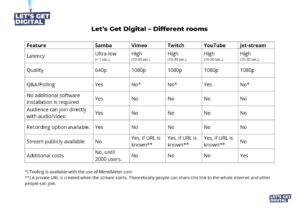
Various streaming services can be used on the platform. For livestream program parts you can use: YouTube, Twitch, Jetstream, Vimeo, Iframe. Ask your Event Consultant for more information or link your AV partner to your Event Consultant to determine the best streaming solution.

What is the quality of the different stream channels?

lgd_quality-300x212


How do I turn off items in Samba?

Click on the gear wheel  at the bottom left to choose which parts you want to have in the bar on the left.

How do I record a session in Samba?

By clicking on the following icon  tat the beginning of a session, the session will be recorded. This can be done by the speaker himself or by one of the organizers (admin).

Can I get a printout of all chats?

Afterwards you will receive an Excel list of all chats, which you can find as the organizer in the admin panel under statistics overview. Of course you will never see the Private Chats between participants. Only the public chats will appear in the Excel overview. Here you can also see exactly how long a participant has been in a program part per session.

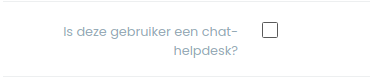
How do I add a helpdesk, to allow attendees to ask technical questions during the event?

You can add the helpdesk at Settings → Advanced → Administrators. Where you can select one of the administrators under the heading ‘actions’ as a helpdesk. See below: 

We’ve got your back

Our software is so user-friendly that you can get started right away. But we also understand that you might have questions or need advice. Our support team is happy to help.


email

info@aanmelder.nl

Frequently Asked Questions


Erhalten Sie Antworten auf all Ihre Fragen über aanmelder.nl
Die FAQ-Seite von aanmelder.nl ist eine wertvolle Informationsquelle für alle, die das Beste aus unserer Plattform herausholen möchten. Hier finden Sie Antworten auf häufig gestellte Fragen, sodass Sie schnell und einfach die gesuchten Informationen finden. Haben Sie eine Frage, die hier nicht aufgeführt ist? Wenden Sie sich dann gerne an unser Support-Team. Sie finden die Antworten auch in unserer Wissensdatenbank.


Was ist aanmelder.nl?

aanmelder.nl ist eine All-in-One-Plattform für Eventmanagement, die für professionelle B2B-Veranstaltungen entwickelt wurde. Sie bietet alles, von der Teilnehmerregistrierung über Event-Websites und Kommunikation bis hin zum Check-in vor Ort und Badge-Druck. Die Plattform wurde 2008 in Delft gegründet und wird von  unterschiedlichsten Organisationen genutzt, variierend von Universitäten und Großunternehmen bis hin zu Berufsverbänden in den gesamten Niederlanden, Belgien und Deutschland. Über aanmelder.nl

Für wen wurde aanmelder.nl entwickelt?

aanmelder.nl wurde für Eventmanager, Marketing-Manager und IT-Teams in B2B-Organisationen, die regelmäßig professionelle Veranstaltungen organisieren, entwickelt. Die Plattform eignet sich hervorragend für wissensorientierte Events wie Kongresse, Konferenzen, akademische Veranstaltungen und Seminare. Organisationen wie IKEA, Exact, die TU Delft und die Universität von Amsterdam nutzen unsere Lösung. Entdecken Sie unsere Eventmanagement-Software

Welche Arten von Events kann ich mit aanmelder.nl organisieren?

aanmelder.nl eignet sich für Kongresse und Konferenzen, Seminare und Workshops, Tage der offenen Tür, Produkteinführungen, Mitarbeiterevents, akademische Veranstaltungen mit Abstract-Handling (Einreichung von Rednerbeiträgen) sowie für Online- und hybride Events. Die Plattform ist sowohl für interne als auch für externe Veranstaltungen ideal und skaliert problemlos von kleinen Workshops bis hin zu großen, mehrtägigen Events mit Tausenden von Teilnehmern. Alle Veranstaltungsarten ansehen

Ist aanmelder.nl nur für niederländische Unternehmen?

Nein. Die Plattform ist auf Niederländisch, Englisch und Deutsch verfügbar. Events können vollständig mehrsprachig eingerichtet werden. Das bedeutet, dass das Anmeldeformular, die Event-Website und die Kommunikation mit den Teilnehmern alle gleichzeitig in mehreren Sprachen angezeigt werden können.
Mehrsprachige Unterstützung

Wie lange gibt es aanmelder.nl schon?

In 2008 gründeten Freek und Jelle aanmelder.nl, nachdem sie Kongresse an der TU Delft organisiert hatten und feststellten, dass es eine bessere Lösung geben muss, als die Teilnehmerregistrierung in Excel zu verwalten. Mittlerweile wurden über 100.000 Events über die Plattform erstellt und mehr als 5,8 Millionen Registrierungen verarbeitet. Lesen Sie die ganze Geschichte

Können mehrere Teams oder Abteilungen ihre eigenen Veranstaltungen über ein einziges Konto verwalten?

Ja. aanmelder.nl unterstützt das Eventmanagement für mehrere Entitäten. Große Organisationen können eine Struktur mit einer Hauptorganisation und Unterorganisationen einrichten, wobei jede Entität über ein eigenes Team und eigene Events verfügt. Benutzerzugang, Daten und der Einkauf werden ganz einfach zentral gesteuert.
Unterorganisationen und Teams

Wie unterscheidet sich aanmelder.nl von allgemeinen Event- oder Ticketing-Tools?

aanmelder.nl ist speziell für professionelle B2B-Events konzipiert und ist nicht gedacht für den öffentlichen Ticketverkauf an Endverbraucher (z.B. für Festivals). Unsere Eventmanagement-Software bietet Funktionen, die exakt auf wissensorientierte Veranstaltungen zugeschnitten sind. Dazu gehören Abstract-Handling, die Erfassung der Teilnahme an Subsessions für die spätere Vergabe von Weiterbildungspunkten, mehrsprachige Unterstützung und die Verwaltung von Unterorganisationen. Zudem verfügt die Plattform über eine ISO 27001:2022-Zertifizierung sowie eine SOC 2 Typ II-Bescheinigung, und alle Daten werden inder EU gehostet.

Ist aanmelder.nl die richtige Wahl für uns?

aanmelder.nl ist eine hervorragende Wahl, wenn Sie professionelle Veranstaltungen organisieren und den gesamten Ablauf für die Teilnehmer an einem Ort verwalten möchten – von der Teilnehmerregistrierung und Kommunikation bis hin zum Event-Check-in und den Badges. Die Plattform eignet sich für einen einzelnen jährlichen Kongress genauso gut wie für Organisationen, die Dutzende von Events pro Jahr veranstalten. Wenn Sie sich noch unsicher sind, ist die kostenlose 30-tägige Testversion der einfachste Weg, um herauszufinden, ob aanmelder.nl zu Ihrer Organisation passt. Sie benötigen dafür keine Kreditkarte. Starten Sie noch heute Ihre kostenlose Testversion 

Wie lange dauert es, ein Event zu erstellen?

aanmelder.nl ist so konzipiert, dass Sie sofort loslegen können. Ihr erstes Anmeldeformular kann bereits innerhalb von 10 Minuten online gehen. Die Plattform führt Sie intuitiv durch jeden Schritt, sodass Sie keinerlei technisches Vorwissen benötigen. Wenn Sie wiederkehrende Events organisieren, kopieren Sie einfach eine vorherige Veranstaltung und passen die Details an, was die Einrichtung nochmals beschleunigt. Unser Support-Team steht Ihnen bei Fragen jederzeit gerne mit Rat und Tat zur Seite.
Legen Sie los mit aanmelder.nl

In welchen Sprachen ist der Support verfügbar?

Unser Support-Team steht Ihnen auf Niederländisch und Englisch zur Verfügung, sowohl vor als auch während Ihres Events. Die Plattform, die Anmeldeformulare, die Event-Webseiten und die Kommunikation mit den Teilnehmern sind auf Niederländisch, Englisch und Deutsch verfügbar. Wenn Sie bei der Einrichtung eines mehrsprachigen Events Hilfe benötigen, unterstützt unser Team Sie jederzeit gerne. Mehrsprachige Unterstützung

Wie funktioniert die Preisgestaltung von aanmelder.nl?

aanmelder.nl arbeitet mit einem Lizenz- und Creditmodell. Eine Lizenz gewährt Ihnen Zugriff auf die Plattform und alle Funktionen. Credits nutzen Sie, um die tatsächliche Nutzung abzurechnen: Anmeldungen, Check-ins, Badge-Druck und bestimmte Add-ons. Sie bezahlen die Lizenz monatlich oder jährlich und erwerben Credits basierend auf Ihrem erwarteten Volumen. Je mehr Credits Sie kaufen, desto höher ist der Mengenrabatt.
Alle Preise ansehen

Was kostet eine Lizenz?

Eine Lizenz kostet 20 € pro Monat. Wenn Sie sich für eine Jahreslizenz entscheiden, erhalten Sie 16,67 % Rabatt, sodass der Gesamtbetrag bei 200 € pro Jahr liegt. Die Lizenz gewährt Ihnen Zugriff auf alle Funktionen der Plattform, eine unbegrenzte Anzahl von Events und eine unbegrenzte Anzahl von Benutzern. Preisseite

Was sind Credits und wie funktionieren sie?

Credits sind die virtuelle Währung, mit der Sie für Dienstleistungen auf aanmelder.nl bezahlen. Ein Credit entspricht einer Anmeldung. Ein Check-in inklusive Badge-Druck kostet 1,5 Credits. Sie erwerben Credits in Kombination mit Ihrer Lizenz. Der Startpreis pro Credit liegt bei 3,20 €, und es sind Mengenrabatte verfügbar. Ungenutzte Credits werden kostenlos ins nächste Lizenzjahr übertragen.
Häufig gestellte Fragen zu Lizenzen und Credits

Can I try aanmelder.nl for free?

Yes. aanmelder.nl offers a free 30-day trial. No credit card is required to get started. During the trial you can set up a registration form, build an event website, and explore the platform features. Start your free trial

What is included in the license?

The license gives you access to all aanmelder.nl tools and features: unlimited events, unlimited users, unlimited registrations, the event website builder, registration forms, communication tools, statistics, and integrations. Usage-based services such as registrations, check-ins, and badge printing are paid for separately in credits. Full feature overview

Kann ich meine Lizenz kündigen?

Sie können Monatslizenzen monatlich und Jahreslizenzen jährlich kündigen. Wenn Sie Ihre Lizenz kündigen, endet der Zugriff auf die aanmelder.nl-Umgebung und die Eventdaten werden gelöscht. Sie benötigen eine aktive Lizenz, um den Zugriff auf Ihr Account und Ihre Daten aufrechtzuerhalten. Häufig gestellte Fragen zum Lizenzmodell

Verfallen ungenutzte Credits?

Nein. Unbenutzte Credits am Ende Ihres Lizenzjahres werden ohne zusätzliche Kosten ins nächste Jahr übertragen. Häufig gestellte Fragen zum Lizenzmodell

Können Credits über mehrere Events aufgeteilt werden?

Ja. Solange die Events zur selben Organisation in aanmelder.nl gehören, können Sie die Credits für all diese Events nutzen. Sie können Credits auch auf eine andere Abteilung innerhalb Ihres eigenen Unternehmens übertragen, dürfen aber nicht an eine andere externe Organisation verkauft oder übertragen werden.
Häufig gestellte Fragen zum Lizenzmodell

Wie schätze ich ein, wie viele Credits ich benötige?

Auf der Preisseite finden Sie einen interaktiven Credit-Rechner. Geben Sie dort einfach Ihre erwartete Teilnehmerzahl, die Anzahl der Anmeldungen mit Zahlungen, Check-ins ohne Badges und Check-ins mit Badge-Druck ein. Der Rechner ermittelt direkt die Gesamtzahl der benötigten Credits sowie die geschätzten Kosten. Benutzen Sie den Credit-Rechner

Unterstützt aanmelder.nl E-Rechnungsstellung und Peppol?

Ja. aanmelder.nl unterstützt die E-Rechnungsstellung und das Peppol-Netzwerk. Dies ist relevant für Organisationen in den Niederlanden, Belgien und Deutschland, wo die Anforderungen an die elektronische Rechnungsstellung zunehmen. E-Rechnungsstellung und Peppol für Events

Eventmanagement

Was umfasst Eventmanagement?

Eventmanagement umfasst alles, was Sie für eine professionelle Veranstaltung benötigen: ein anpassbares Anmeldeformular, einen Website-Builder für Events, die Kommunikation mit Teilnehmern, das Teilnehmermanagement, Echtzeit-Event-Statistiken und Integrationen mit anderen Tools. Die Ticketing und Finanzverwaltung steht Ihnen als Add-on zur Verfügung. Alles wird über ein einziges Dashboard gesteuert. Entdecken Sie unsere Eventmanagement-Software

Kann ich mit aanmelder.nl eine Event-Webseite erstellen?

Ja. aanmelder.nl bietet einen integrierten Website-Builder für Events. Sie können eine Event-Seite in Ihrem eigenen Corporate Design erstellen, mit speziellen Bereichen für Ihr Programm, Ihre Redner, Anfahrtsbeschreibung und die Anmeldung. Sie benötigen dafür kein externes CMS oder  separates Website-Tool.
Website-Builder für Veranstaltungen

Kann ich automatisch Teilnahmezertifikate versenden?

Ja. Sie können Zertifikate in Ihrem eigenen Corporate Design gestalten und so einrichten, dass diese, auf Basis der Check-in-Daten, nach dem Event automatisch an die anwesenden Teilnehmer gesendet werden.
Eventmanagement Funktionen

Unterstützt aanmelder.nl PE-unkte oder die Dokumentation von Weiterbildungen?

Ja, aanmelder.nl unterstützt die Vergabe von PE-Punkten. Mit dem Event-Check-in erfassen Sie die Anwesenheit bei Teilsitzungen oder Workshops und können auf dieser Grundlage PE-Punkte vergeben. Anschließend können Sie die Teilnehmer segmentieren, gezielte E-Mails versenden und (automatisch) Zertifikate ausstellen. Eventmanagement

Können wir bestehende Teilnehmerlisten nach aanmelder.nl migrieren?

Ja. Sie können Teilnehmerlisten ganz einfach in großen Mengen per Excel-Import zu aanmelder.nl hinzuzufügen, um somit neue Anmeldungen anzulegen oder bestehende zu aktualisieren. Sie können auch eine Kontaktliste importieren, Labels basierend auf der Zielgruppe zuweisen und diese nutzen, um Einladungen und die Kommunikation zu versenden. Doppelte E-Mail-Adressen filtert die Plattform automatisch heraus. Für Organisationen, die einen automatisierten Datenfluss zwischen aanmelder.nl und einem bestehenden CRM ohne manuelle Importe möchten, hält eine API-Anbindung die Daten zwischen den Systemen synchron. Das spart Ihnen wertvolle Zeit und vermeidet Fehler.

Kann ich meine eigene Domain nutzen?

Ja. Es gibt drei Möglichkeiten, Ihre Veranstaltung unter Ihrer eigenen Webadresse zu veröffentlichen. Sie erwerben direkt über aanmelder.nl einen neuen Domainnamen für 71 € pro Jahr (zzgl. MwSt.), inklusive SSL-Zertifikat und automatischer Konfiguration samt E-Mail-Authentifizierung. Wenn Sie bereits über eine Domain oder Subdomain verfügen, können Sie diese für eine einmalige Gebühr von 71 € (zzgl. MwSt.) mit Ihrem aanmelder.nl-Event verknüpfen, ebenfalls inklusive SSL. Wenn Sie schon eine bestehende Webseite haben und keine separate Domain wünschen, können Sie das Anmeldeformular ohne zusätzliche Kosten direkt auf einer aanmelder.nl-URL veröffentlichen. Ihre Webseite auf der aanmelder.nl-Domain

Kann ich Teilnehmerdaten exportieren?

Ja. Sie können die Teilnehmerdaten jederzeit über Ihr Dashboard exportieren, entweder als vollständigen Export aller Anmeldungen oder als gefilterte Auswahl. Die Exportdateien enthalten sämtliche Anmeldedetails, Antworten auf benutzerdefinierte Fragen und gegebenenfalls den Zahlungsstatus. Eventstatistiken können auch separat für Berichte oder Analysen nach der Veranstaltung exportiert werden. Für Organisationen, bei denen die Daten automatisch in ein CRM-System oder andere Systeme fließen müssen, regelt eine API-Anbindung dies ganz ohne manuelle Exporte. Teilnehmerdaten verwalten

Kann eine einzige Veranstaltung mehrere Sprachversionen haben?

Ja. Ein einzelnes Event kann gleichzeitig auf Niederländisch, Englisch und Deutsch live übertragen werden. Teilnehmer sehen das Anmeldeformular, die Event-Webseite und die Bestätigungs-E-Mails automatisch in ihrer bevorzugten Sprache. Die Einrichtung dieser Sprachvarianten ist ganz einfach: aanmelder.nl verfügt über ein integriertes KI-Übersetzungstool, das die Übersetzungen für Sie generiert, sodass Sie diese vor der Veröffentlichung nur noch überprüfen und anpassen müssen. Mehrsprachige Unterstützung

Event-Check-in

Was ist Event-Check-in und wie funktioniert es?

Der Event-Check-in ist die Lösung vor Ort, um Teilnehmer willkommen zu heißen. Besucher erhalten bei ihrer Anmeldung einen QR-Code. Am Eingang scannen Sie diesen QR-Code und drucken sofort ein personalisiertes Badge aus. Dadurch erhalten Sie in Echtzeit Einblick in die Anwesenheit, Check-in-Daten auf Session-Ebene und No-Show- Nachverfolgung – alles innerhalb desselben Dashboards. Event-Check-in 

Muss ich Geräte mieten oder kann ich mein eigenes Gerät benutzen?

Beide Optionen sind möglich. Mit der Event Check-in App können Sie einfach Ihr eigenes Smartphone oder Tablet benutzen, um Teilnehmer einzuchecken. Hierfür ist weder zusätzliche Hardware noch der Druck von Badges erforderlich. Für den Badge-Druck bietet aanmelder.nl die Gerätemiete pro Event mit optionalem Vor-Ort-Support an. Für Organisationen, die regelmäßig Events veranstalten, stehen zudem Leasing-Modelle zur Verfügung. Event Check-in App 

Können Aussteller während des Events Leads sammeln?

Ja. Mit der Prospector-App scannen Aussteller QR-Codes der Teilnehmer, um Kontaktdaten für das Follow-up nach dem Event zu erfassen.
Prospector-App

Abstract-Handling

Was ist Abstract-Handling und welche Events benötigen es?

Mit dem Abstract-Handling verwalten Sie die Einreichung von Rednern und Papers bei akademischen oder wissensbasiertenorientierten Kongressen, wobei Autoren Beiträge einreichen, bevor diese zugelassen werden. Autoren reichen ihre vorschläge über ein Formular ein, die Einreichungen werden den Gutachtern zugewiesen, diese vergeben Bewertungen sowie Kommentare, und Sie steuern die Annahme und die Kommunikation von einem zentralen Punkt aus. Abstract-Handling

Integrationen

Mit welchen Tools kann aanmelder.nl verknüpfen?

aanmelder.nl kann mit  CRM-Systeme, E-Mail-Marketing-Tools und Buchhaltungssoftware wie HubSpot, Salesforce und Exact verknüpft werden. Zudem steht eine offene API zur Verfügung, mit der Ihr eigenes Entwicklungsteam technische Anbindungen realisieren kann. Übersicht Verknüpfungen

Verfügt aanmelder.nl über eine API?

Ja. aanmelder.nl bietet eine dokumentierte API für technische Verknüpfungen. Die vollständige API-Referenz ist öffentlich zugänglich.
API-Dokumentation

Ist aanmelder.nl DSGVO-konform?

Ja. aanmelder.nl ist vollständig DSGVO-konform. Privacy-by-Design ist von Grund auf in die Plattform integriert. Es gibt einen festen Datenschutzbeauftragten (DSB), klare Prozesse für die Bearbeitung der Datenschutzrechte von Betroffenen und alle Teilnehmerdaten werden in der EU gespeichert. Ein Auftragsverarbeitungsvertrag (AVV) auf Basis der EU-Standardvertragsklauseln steht zur Verfügung. Sicherheit & Compliance

Wo werden meine Daten gespeichert?

Alle Daten werden in der EU gespeichert. Dies umfasst Veranstaltungsdaten, Anmeldedaten und Teilnehmerinformationen. Sicherheit & Compliance

Welche Sicherheitszertifizierungen hat aanmelder.nl?

aanmelder.nl verfügt über eine ISO 27001:2022-Zertifizierung (vergeben von DNV) und eine SOC 2 Typ II-Bescheinigung. ISO 27001 ist der internationale Standard für Informationssicherheitsmanagement. SOC 2 Typ II liefert den unabhängig geprüften Nachweis, dass die Sicherheitsmaßnahmen effektiv funktionieren. Sie können die entsprechenden Zertifikate herunterladen.
Sicherheit & Compliance

Ist ein Auftragsverarbeitungsvertrag verfügbar?

Ja. aanmelder.nl bietet Auftragsverarbeitungsverträge (AVV) auf Basis der EU-Standardvertragsklauseln an. Dies bietet eine rechtlich solide Grundlage für Organisationen, die Teilnehmerdaten verarbeiten und einen formellen Auftragsverarbeitungsvertrag benötigen.
Sicherheit & Compliance

Eignet sich aanmelder.nl für Organisationen, die unter DORA fallen?

DORA (Digital Operational Resilience Act) gilt für Organisationen im Finanzsektor innerhalb der EU und stellt Anforderungen an das IT-Risikomanagement, einschließlich der Software von Drittanbietern. Dank der ISO 27001:2022-Zertifizierung und der SOC 2 Typ II-Bescheinigung ist aanmelder.nl hervorragend für Organisationen aufgestellt, deren Einkaufsanforderungen durch DORA bestimmt werden. DORA und Eventmanagement-Software

Können Organisationen mit strengen IT-Sicherheitsanforderungen aanmelder.nl nutzen?

Ja. aanmelder.nl verfügt über eine ISO 27001:2022-Zertifizierung sowie eine SOC 2 Typ II-Bescheinigung, wendet Sicherheitsmaßnahmen auf fünf Schutzebenen an, hostet alle Daten sicher in der EU und bietet herunterladbare Zertifikate sowie eine Anwendbarkeitserklärung für IT- und Compliance-Teams an. Sicherheit & Compliance

Tipps, Trends, How-to’s und Neuigkeiten