We’ve got your back
Our software is so user-friendly that you can get started right away. But we also understand that you might have questions or need advice. Our support team is happy to help.
info@aanmelder.nl
Get answers to your questions about aanmelder.nl
aanmelder.nl’s FAQ page is a valuable resource for anyone looking to get the most out of our platform. It contains answers to common questions, making it easy to find the information you need. If you have any further questions or concerns, please do not hesitate to contact our support team. Your answers are also available in our knowledge base. Go to knowledge base
Do you have other questions? Do not hesitate to contact us by email, phone or chat. We are always happy to help you when needed!
Email authentication can optimize the delivery of your sent messages. aanmelder.nl supports DKIM en DMARC e-mailauthentication. You can reduce the risk that your message will be seen as spam and ends up in the spam folder. Click here for more information about e-mail authentication Do you want to use email authentication on the domain name that you have set as the sender for your messages? Please contact us.
Yes. Our Event Management software is multilingual and available in Dutch, English and German. You can also make your communication, event site and registration form appear in these three languages.
Has a participant already paid and do you want to refund this payment? You can process refunds for each participant. Click here for instructions for a refund. You can also find information about Bulk refunds, if you need to do refunds for a specific participant group of all participants without having to do this per person.
A refund is a payment back to the participant if they have already paid. You can credit an invoice if the participant has not yet paid and you want to set the amount of the invoice to 0. Click here for the support article about refunds.
You can add (new) users into your organisation and add them to your events. You can manage the users when you are the owner of the organisation. Here you can add an user as a co-organizer or only give the user limited access to the registrations. If you click on ‘organization’ at the top right of the pink navigation bar, you will go to the organization dashboard. Here you can get started with your events and sharing the events with other users.
The invoice from aanmelder.nl you will be sent to the invoice address that you have added in your billing profile. Go to the pink navigation bar on your dashboard and click on ‘settings’. Here you can see which billing profile is used for this event and edit the profile when needed. You can also add PO numbers here. Do you mean the invoice details on a participant invoice? Go to ‘registrations’ on the dashboard where you can find the invoice of the participant. You can manage the participant invoices here.
A tutorial is shown here about using the registration form and linking the questions. Or you can read the support article here. So you can make certain questions show as a result of an answer to a previous question!
Do you have a paid event with tickets for your participants? In ‘Payments’ on your dashboard, you can add a payment system (OBP of DCS), choose payment methods for your participants, and create the tickets for your event Here you can set the prices of the different tickets in your event. You can link these tickets to questions from the registration form. It is important that you link this coreectly so the participant can pay the right price. You can see our tips & tricks on linking tickets here.
Are the participants already registered and you need to reschedule the event to another date? In that case, you can keep working in your current event, but sometimes it’s better to start over with a completely new event. Do you prefer the first option? Our advise is to send a message to the registered persons via the message center so they can confirm their participation for the event on the new date. You can create a message which contains a button with a link, that will redirect participants to their registration form to edit their registration (in this case confirm their participation for the new date). You can also do the same when participants need to choose a workshop, in case the program and workshops were not final during the pre-registration. Before creating this message, please check the following: firstly, make sure that the setting ‘editing of registration’ is not checked under website settings. And make sure that you have added a new question to the registration form, such as the new date of the event or the workshops can choose from. Then add a button with a link in the message. After adding a button in the message, click on the pen and then choose ‘edit form’ in the dropdown. This way your participants will be redirected to their registration form by clicking on ths button so they can edit/change their registration. Click here for more information.
Do you want to personalize the conformation message by showing the name of the participant in the saluation? Or do you want to show the choices as made in the registration form by the participant? Use an automatic replacement word or an answer code of the relevant question from the registration form. Click here for instructions for a refund.
You can find this in ‘website settings’. Initially, the name of your event will be www.aanmelder.nl/111111 (a 6 digit number that is unique for each event). You can replace the 6 digits with your own event name (click here for the article). You can also use your own web address by buying a new domain or linking an existing domain.
You can create different types of messages in the message center on your dashboard. After you have created your message, click on ‘send settings’. Before you actually send out the messages you can send a test e-mail. This is only possible when you have made some changes in the content of your e-mail, have added the subject of the e-mail and have selected who you want to address the e-mail to (so that the system can send a testmail using the data of a actual recipient). It is recommended that you always send a test email before you send it to your participants so you can test everything properly.
Do you want to help us make your work easier? Be among the first ones to check out new or improved features before they are released and give your feedback! Let us know what helps, what could be improved, and what works best for you. Check the user research page, sign up and participate in our user research studies.
You can take part in three kinds of research studies: Interviews, usability testing and field studies. If you choose to have an interview you will have one-on-one conversations with our UX researcher Lila to discuss your experiences, challenges, and insights as an event organizer.
If you choose usability testing you will have the opportunity to attend hands-on sessions where you test new features before they're released, providing feedback on their functionality and usability.
In case you decide to join a field study, ourresearcher may shadow you during events to understand your workflow as to identify areas for improvement.
While the exact duration can vary depending on the study type, user interviews are typically scheduled for up to one hour. Other sessions, such as usability testing or field studies, are designed to be flexible and accommodate your schedule. Lila Özkazanç, aanmelder.nl's UX researcher will be the one to conduct the interviews and answer your questions.
Yes, sessions are recorded to allow the team to review and evaluate insights carefully. However, your privacy is a priority—the recordings and findings are shared only within the company and are used solely to develop new features, enhance existing ones, and guide the future vision of aanmelder.nl.
If you are going to organize an online event, you will find the answers to the most frequently asked questions below. We also have an FAQ for participants. We always send this FAQ after the set-up meeting. The FAQ for participants is also available. We always send this FAQ after the set-up meeting.
We can imagine that it’s difficult to imagine what the online platform looks like. Registering for an Expert Session is a good opportunity to experience what the platform looks like. You can register here. Registering for an Expert Session is a good opportunity to experience what the platform looks like.
After the first contact you will receive a checklist from us, which provides a timeline and a list of tasks to stay on schedule. You can also view this tutorial, so you can get started right away.
The admin panel is the first thing you see when you log in as an organizer (administrator) with your personal login details. You will see the overview panel from which you will organize the entire event. Learn more about the admin panel: watch the tutorial .
View this tutorial on how to add a user.
Participants gain access to the event via a personal participation link that they receive by email. This email also includes their username (their email address) and password. You can adapt the available templates for the mailings to your own needs. It is important that the personal link and login details are always sent. These are unique for everyone.
View this (dutch tutorial to learn more about it. You can also send this tutorial to the exhibitors.
View the tutorial on how to add a company.
When you upload more than 16 companies you will get a search bar.
There is a special area, a so-called booth, where you can store text, logo, video, contacts, downloadable documents, e-mail addresses and website links.
If you want to add a downloadable file to your company booth, this can only be done via a file URL. You add this to your company page, via ‘edit company’, ‘extra details company’. You add such a file URL in the following way:
View the tutorial on adding program components here.
Participants click on the lobby tile ‘program’ to see the full program overview. When they click on the session they want to join, they will see the ‘enter session’ button.
Participants can chat with each other during a session, give their opinion via a poll, participate in a quiz, form a word cloud together or ask their questions in the Q&A. These questions can be answered live in the session by the speaker or by a moderator.
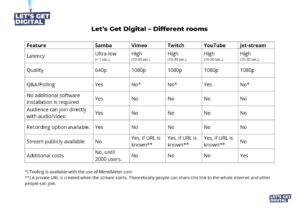
Various streaming services can be used on the platform. For livestream program parts you can use: YouTube, Twitch, Jetstream, Vimeo, Iframe. Ask your Event Consultant for more information or link your AV partner to your Event Consultant to determine the best streaming solution.

Click on the gear wheel
at the bottom left to choose which parts you want to have in the bar on the left.
By clicking on the following icon
tat the beginning of a session, the session will be recorded. This can be done by the speaker himself or by one of the organizers (admin).
Afterwards you will receive an Excel list of all chats, which you can find as the organizer in the admin panel under statistics overview. Of course you will never see the Private Chats between participants. Only the public chats will appear in the Excel overview. Here you can also see exactly how long a participant has been in a program part per session.
You can add the helpdesk at Settings → Advanced → Administrators. Where you can select one of the administrators under the heading ‘actions’ as a helpdesk. See below: 
Our software is so user-friendly that you can get started right away. But we also understand that you might have questions or need advice. Our support team is happy to help.
info@aanmelder.nl
aanmelder.nl is an all-in-one event management platform built for professional B2B events. It covers everything from participant registration, event websites, and communication to on-site check-in and badge printing. Founded in Delft in 2008, the platform is used by organisations ranging from universities and large corporates to professional associations across the Netherlands, Belgium, and Germany. About aanmelder.nl
aanmelder.nl is built for event managers, marketers, and IT teams at B2B organisations who run professional events on a regular basis. It is well suited for knowledge-based events such as congresses, conferences, academic events, and seminars. Organisations like IKEA, Exact, TU Delft, and the University of Amsterdam use the platform. Explore Event Management
aanmelder.nl is suitable for congresses and conferences, seminars and workshops, open days, product launches, staff events, academic events with abstract submissions, online events, and hybrid events. It works for both internal and external events and scales from small workshops to large multi-day events with thousands of participants. See all event types
No. The platform is available in Dutch, English, and German. Events can be set up as fully multilingual, meaning the registration form, event website, and participant communication can all be displayed in multiple languages at the same time. Multilingual support
aanmelder.nl was founded in 2008 by Freek and Jelle after organising conferences at TU Delft and realising there had to be a better way than managing participant registration in Excel. More than 100,000 events have been organised on the platform, with over 5.8 million registrations processed. Read the full story
Yes. aanmelder.nl supports multi-entity event management. Large organisations can set up a structure with a parent organisation and sub-organisations, giving each entity its own branding, user access, and budget settings while keeping central oversight. Sub-organisations and teams
aanmelder.nl is built specifically for professional B2B events, not public consumer ticketing. It includes features designed for knowledge-based events such as abstract handling, CE credit tracking, multilingual support, and sub-organisation management. It holds ISO 27001:2022 and SOC 2 Type II certifications, and all data is hosted in the EU. Why aanmelder.nl
aanmelder.nl is a good fit if you organise professional events and want to manage the full participant journey in one place, from registration and communication to check-in and badges. It works equally well for a single annual conference as it does for an organisation running dozens of events a year. If you are not sure, the free 30 day trial is the easiest way to find out. No credit card needed. Start your free trial
aanmelder.nl is designed so you can get started right away. Your first registration form can be live in under 10 minutes. The platform guides you through each step intuitively, so no technical knowledge is needed. If you organise recurring events, you can clone a previous event and adjust the details, which makes setup even faster. The support team is available if you need advice along the way. Get started with aanmelder.nl
The support team is available in Dutch and English, before and during your event. The platform, registration forms, event websites, and participant communication are available in Dutch, English, and German. If you need help setting up a multilingual event, the team is happy to think through it with you. Multilingual support
aanmelder.nl works with a license and credits model. A license gives you access to the platform and all its features. Credits are used to pay for actual usage: registrations, check-ins, badge printing, and certain add-ons. You pay for the license monthly or annually and purchase credits based on your expected volume. The more credits you buy, the greater the volume discount. See full pricing
A license costs €20 per month. If you choose an annual license, you receive a 16.67% discount, bringing the total to €200 per year. The license gives you access to all platform features, unlimited events, and unlimited users. Pricing page
Credits are the virtual currency used to pay for services on aanmelder.nl. One credit equals one registration. A check-in including badge printing costs 1.5 credits. Credits are purchased alongside your license. The starting price per credit is €3.20, with volume discounts available. Unused credits carry over to the next license year at no additional cost. License and credits FAQ
Yes. aanmelder.nl offers a free 30-day trial. No credit card is required to get started. During the trial you can set up a registration form, build an event website, and explore the platform features. Start your free trial
The license gives you access to all aanmelder.nl tools and features: unlimited events, unlimited users, unlimited registrations, the event website builder, registration forms, communication tools, statistics, and integrations. Usage-based services such as registrations, check-ins, and badge printing are paid for separately in credits. Full feature overview
No. Any unused credits at the end of your license year carry over to the following year at no additional cost. License model FAQ
Yes. As long as events are within the same organisation in aanmelder.nl, credits can be used across all of them. Credits can also be transferred to another department within your own company, but cannot be sold or transferred to a different organisation. License model FAQ
The pricing page includes an interactive credit calculator. Enter your expected number of participants, registrations with payments, check-ins without badges, and check-ins with badge printing. It calculates the total credits required and estimated cost. Use the credit calculator
Yes. aanmelder.nl supports e-invoicing and the Peppol network. This is relevant for organisations in the Netherlands, Belgium, and Germany where electronic invoicing requirements are increasing. E-invoicing and Peppol for events
Event Management covers everything needed to run a professional event: a customisable registration form, an event website builder, participant communication, attendee management, real-time statistics, and integrations with other tools. Ticketing and financial administration is available as an add-on. Everything runs from one dashboard. Explore Event Management
Yes. aanmelder.nl includes a built-in event website builder. You can create a branded event page with sections for your programme, speakers, directions, and registration. No external CMS or separate website tool is needed. Event website builder
Yes. You can design certificates in your own branding and set them to be sent automatically to attending participants after the event, based on check-in data. Event Management features
Yes. aanmelder.nl supports a complete workflow based on actual attendance recorded through Event Check-in. From there you can segment participants, send targeted emails, and issue automated certificates once the required credits are earned. Event Management
Yes. You can add participant lists to aanmelder.nl in bulk by importing an Excel file, either to add new registrations or to update existing ones. You can also import a contact list, assign labels by target group, and use it to send invitations and communication. Duplicate email addresses are filtered automatically. For organisations that want participant data to flow between aanmelder.nl and an existing CRM without manual imports, the API keeps data synchronised across systems automatically, saving time and preventing errors.
Yes. There are three ways to publish your event under your own web address. You can purchase a new domain name directly via aanmelder.nl for €71 per year (excl. VAT), which includes an SSL certificate and is set up automatically including email authentication. If you already have a domain or subdomain, you can link it to your aanmelder.nl event for a one-time fee of €71 (excl. VAT), also including SSL. If you have an existing website and do not want a separate domain, you can embed the registration form directly on your own site at no additional cost. Embedding your domain aanmelder.nl
Yes. You can export participant data from your dashboard at any time, either a full export of all registrations or a filtered selection. Exports include all registration details, custom question answers, and payment status where applicable. Event statistics can also be exported separately for reporting or post-event analysis. For organisations that need data to flow automatically into a CRM or other systems, the API handles this without manual exports. Managing participant data.
Yes. A single event can run simultaneously in Dutch, English, and German. Participants see the registration form, event website, and confirmation emails in their preferred language automatically. Setting up language variants is straightforward: aanmelder.nl has a built-in AI translation tool that generates the translations for you to review and adjust before publishing. Multilingual support
Event Management handles registration, communication, and administration. The Event Platform is the virtual environment where online or hybrid events take place. Participants log in to access live sessions, a programme, exhibitor booths, networking, and interactive tools like polls and Q&A. It is integrated with Event Management so registration data, branding, and participant access all flow through one system. Event Platform
Yes. In-person attendees are registered and checked in through Event Management and Event Check-in, while remote attendees access the event through the Event Platform. Both are managed from the same dashboard. Hybrid events
Event Check-in is the on-site solution for welcoming participants. Attendees receive a QR code upon registration. At the entrance, the QR code is scanned and a personalised badge prints instantly. You get real-time attendance insight, session-level check-in data, and no-show tracking, all in the same dashboard. Event Check-in
Both options are available. Check-in Mobile lets you use your own phone or tablet to check in participants without extra hardware or badge printing. For badge printing, aanmelder.nl offers equipment rental per event with optional on-site support, and leasing for organisations that run events regularly. Check-in Mobile
Yes. The Prospector app allows exhibitors to scan participant QR codes to capture contact information for post-event follow-up. Prospector app
Abstract handling manages speaker and paper submissions at academic or knowledge-based conferences where authors submit proposals before being accepted. Authors submit through a form, submissions are assigned to reviewers, reviewers score and comment, and you manage acceptance and communication from one place. Abstract handling
Yes. aanmelder.nl has a documented API for technical integrations. The full API reference is publicly available. API documentation
Yes. aanmelder.nl is fully GDPR compliant. Privacy-by-design is built into the platform from the ground up. There is a dedicated Data Protection Officer, clear processes for data rights requests, and all participant data is hosted in the EU. A data processing agreement based on EU Model Clauses is available. Security and compliance
All data is hosted in the EU. This includes event data, registration data, and participant information. Security and compliance
aanmelder.nl holds ISO 27001:2022 certification (awarded by DNV) and SOC 2 Type II certification. ISO 27001 is the international standard for information security management. SOC 2 Type II provides independently audited proof that security controls are operating effectively. Certificates are available to download. Security and compliance
Yes. aanmelder.nl offers processor agreements based on EU Model Clauses, providing a legally sound foundation for organisations that process participant data and need a formal DPA in place. Security and compliance
DORA (Digital Operational Resilience Act) applies to financial sector organisations in the EU and sets requirements for managing ICT risk including third-party software. With ISO 27001:2022 and SOC 2 Type II certifications, aanmelder.nl is well positioned for organisations with DORA-driven procurement requirements. DORA and event software
Yes. aanmelder.nl holds ISO 27001:2022 and SOC 2 Type II certifications, applies security across five protection levels, hosts all data in the EU, and provides downloadable certificates and a statement of applicability for IT and compliance teams. Security and compliance